CASE STUDY
Pharmacy Management System
A centralized digital platform for prescription workflows, patient records, drug information and pharmacy billing.
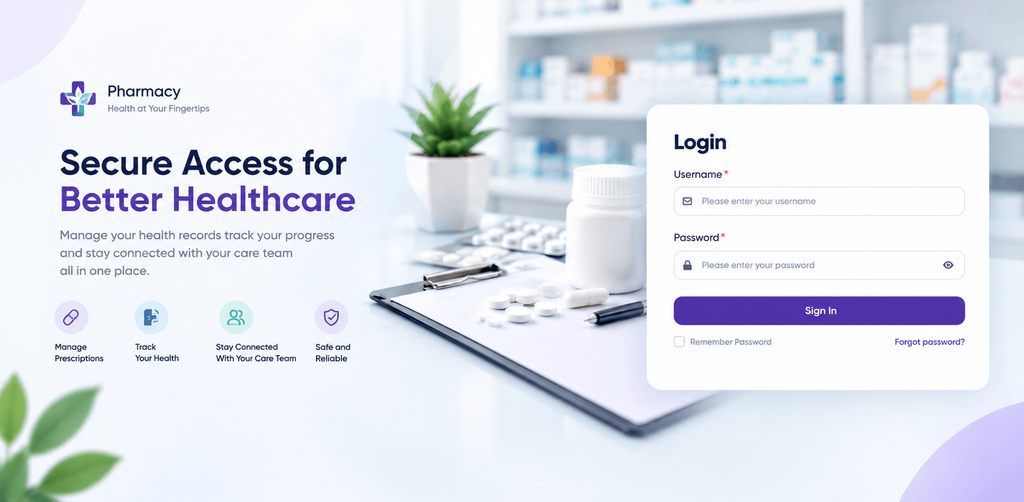
The secure sign in screen of the Pharmacy Management System
Project at a Glance
| Solution A pharmacy management platform built for daily prescription and operations work | Focus Prescription review, patient records, drug data, refill notifications and billing |
| Key Modules Dashboard, Patients, Prescriptions, Formulary, Notifications and Invoicing | Users Pharmacy teams, administrators and billing staff |
Project Overview
The Pharmacy Management System is a centralized digital platform that brings the daily work of a pharmacy into one organized place. It covers incoming prescriptions, patient records, doctor and patient matching, medicine and drug information, refill notifications and organization billing.
The software is designed to solve a common problem. Pharmacy information often lives in many different places, such as paper, scanned files and separate tools, which makes it hard to keep work organized and consistent. The platform replaces this scattered approach with a single environment where every team member can find what they need.
The result is a pharmacy operation that is more organized, more efficient and easier to manage, while the pharmacist stays in control of every important decision.
The Challenge
Pharmacies handle a large amount of sensitive and detailed information every day. Without a centralized digital management system, several common challenges can appear. The Pharmacy Management System was designed to address each of the following areas.
- Prescription management. Prescriptions arrive in different forms and from many prescribers. Without one place to track them, it is hard to know which are new, which are waiting and which are complete.
- Prescription verification. Every prescription needs a careful check of the prescriber, the patient and each medicine. Doing this by hand takes time and leaves room for oversight.
- Medicine and drug information. Medicine names, strengths, forms and routes can be written in many ways. Inconsistent information is harder to search, compare and dispense.
- Patient information. Contact details, billing terms and communication preferences can become scattered, outdated or difficult to trace.
- Pharmacy workflows. Tasks that depend on each other, such as reading a prescription, checking it and informing the patient, can lose momentum when handled in separate places.
- Data organization. Documents, records and reference lists that are not well organized take longer to find and are harder to keep consistent.
- Manual processes. Retyping details from paper or scanned prescriptions is slow, repetitive and open to mistakes.
- Information accuracy. When the same fact is stored in several places, the copies can drift apart. Teams need one dependable source of truth.
- Operational visibility. Managers need to see what is pending, what has been communicated and what needs attention without chasing updates from different people.
Our Approach
Our approach was to build one connected platform around the natural flow of pharmacy work: receive a prescription, read it, verify it, support dispensing, notify the patient and handle billing. Each stage became a clear, focused screen within a single application, so teams no longer need to move between disconnected tools.
| Centralize Everything Prescriptions, patients, drug data, notifications and billing live in one environment with one simple navigation menu. | Structure The Information Free text is turned into organized fields, standard reference lists and a verified formulary so data stays consistent. |
| Keep People In Control Repetitive reading and calculation is automated, while a pharmacist makes the final confirm or decline decision. | Make Activity Traceable Changes, messages and processing steps are recorded in logs so teams can always see what happened and when. |
The interface follows the same pattern across every module. A left menu groups the platform into Main, Billing, Patients and Formulary areas, and each page presents its information in clean tables, tabs and clearly labeled actions.
The Solution
The Pharmacy Management System brings together the tools a pharmacy needs in one secure platform. Access begins with a simple sign in screen that asks for a username and password, with options to remember the password or reset it. Once signed in, users reach a dashboard and a menu that leads to every part of the system.
The core modules below support the wider pharmacy workflow. Prescription handling, scanning, drug normalization, reprocessing and the drug catalogue each have their own dedicated section later in this document.
Core Platform Modules
Document Dashboard
What it does. The dashboard shows uploaded documents as clear cards with the file name, the upload time and the number of patients in each file. Users can search, view and download documents, and move between work queues for syncing, data entry, physical checks and completed items.
Why it is useful. It gives the team a starting point for the day and keeps documents organized in one place instead of scattered folders.
Workflow impact. Staff can see where each document stands and pick up the next task without asking around.
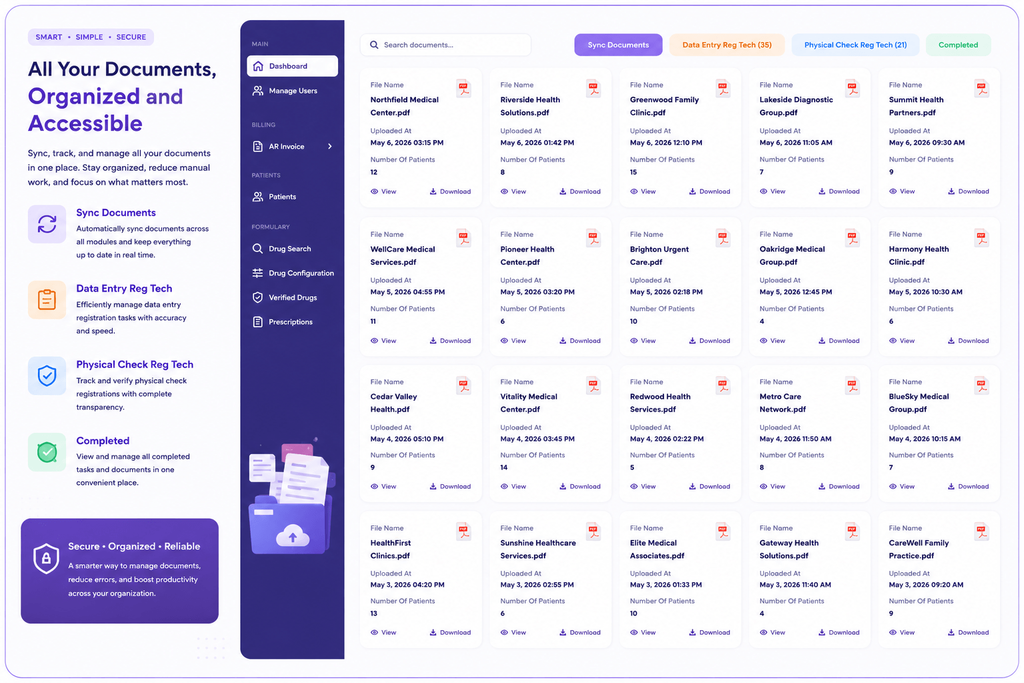
The dashboard organizes uploaded documents and work queues
Patient Records
What it does. Each patient record is divided into three tabs: general information, account billing settings and prescription notifications. A notification history lists each change to a patient setting, who made it and when.
Why it is useful. Separate tabs keep each kind of information easy to reach, and the history shows how a record came to be set up the way it is.
Workflow impact. Staff update contact preferences quickly and can always trace a change back to its source.
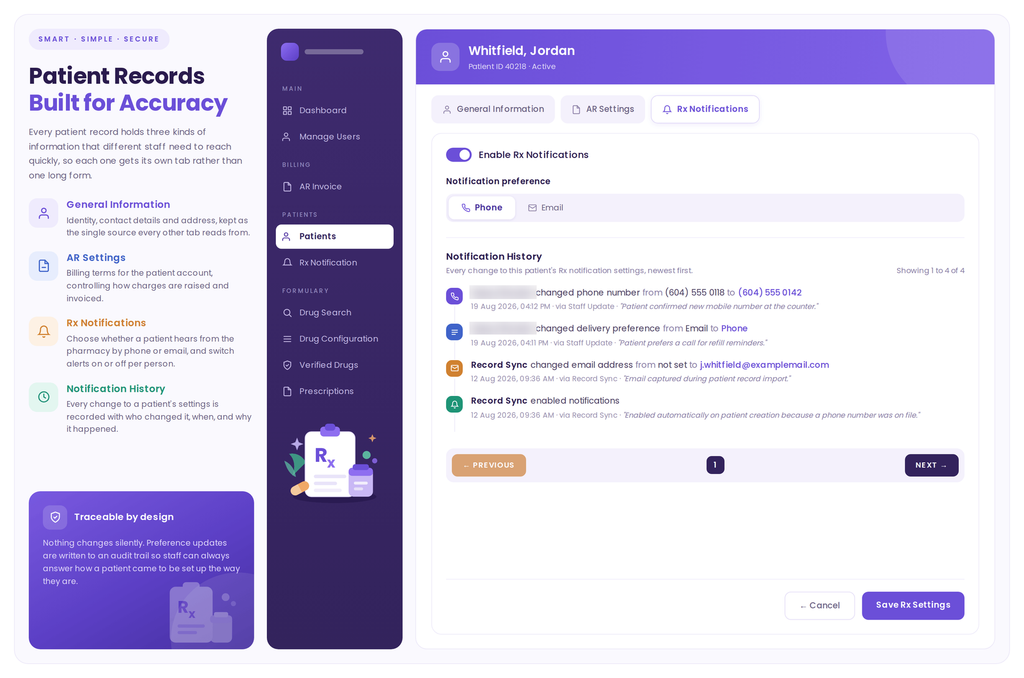
Patient records with notification preferences and change history
Prescription Notifications
What it does. The platform sends automated refill and pickup messages by voice or text, based on each patient preference. A notification log records every message with its time, channel, recipient and delivery status. Staff can search by patient, phone number or email and narrow results by time range.
Why it is useful. The log shows what a patient was told and when, and it highlights messages that did not reach the patient.
Workflow impact. Teams can answer patient questions in seconds and quickly spot messages that need follow up.
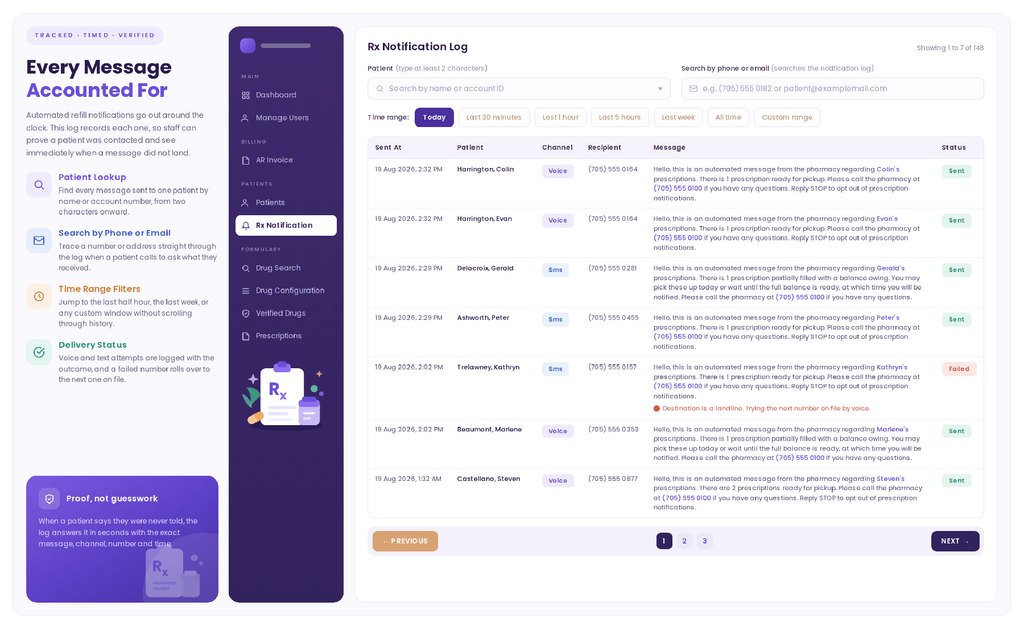
The notification log records each message and its delivery status
Organization Invoicing
What it does. The billing area lets staff generate invoices, send them by email, prepare printed mail invoices and delivery invoices, and add organizations. A summary strip shows totals for generated, sent and opened invoices, and a table tracks the status of each one.
Why it is useful. Billing tasks sit beside the rest of the pharmacy workflow, with clear statuses and simple search and filters.
Workflow impact. Invoices move from generation to delivery in a visible, organized way, which supports timely and accurate billing.
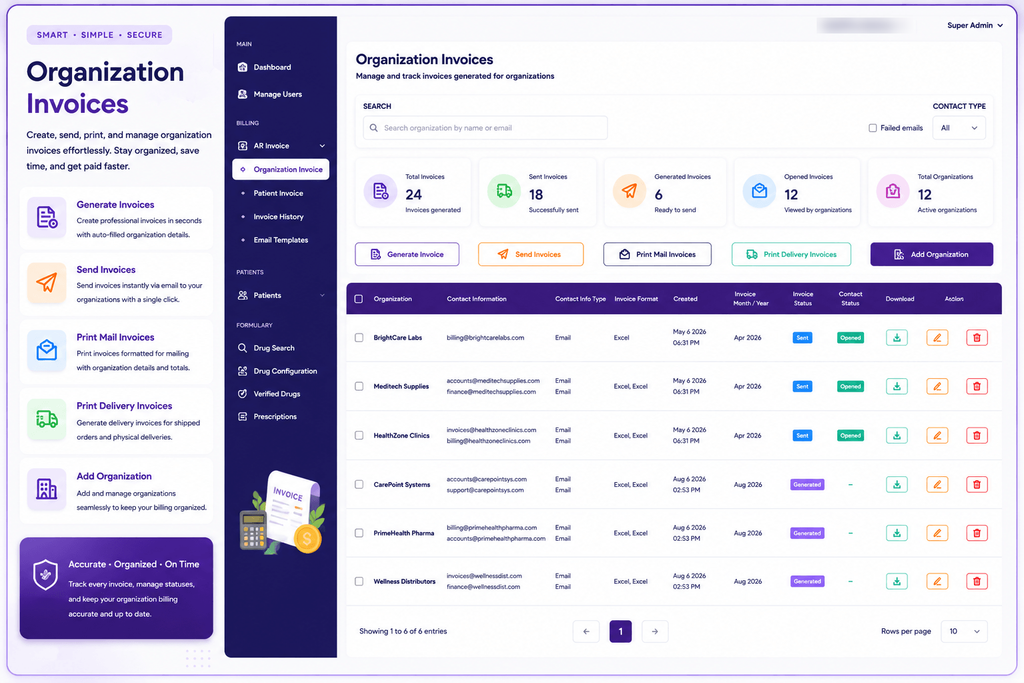
Organization invoicing with status tracking and delivery options
Key Features
The platform brings together a focused set of capabilities that support the full pharmacy workflow.
| Prescription Management Search, filter and review every prescription in one organized list. | Prescription Verification Prescriber and patient matching with a clear confirm or decline decision. | OCR Prescription Scanning Upload scanned prescriptions and review the extracted details. |
| Drug Normalization Raw prescription text shown beside standardized medicine values. | Prescription Reprocessing Run a prescription through processing again whenever it is needed. | Patient Records Organized profiles with contact details, billing terms and preferences. |
| Refill Notifications Voice and text messages with a searchable delivery log. | Verified Drug Catalogue A curated list of verified generics with products, vendors and stock. | Reference Data Control Routes, dosage forms and groups maintained by pharmacy staff. |
| Organization Invoicing Generate, send, print and track organization invoices. | Document Dashboard Uploaded documents and work queues in a single view. | Traceable Activity Logs and histories that show who did what and when. |
Prescription Management
Prescription management is at the heart of the platform. Every prescription appears in a single list that shows the written date, prescriber, patient, status, medicines and upload time. Staff can filter by status, choose a custom date range and search by prescription number or prescriber name.
New prescriptions can be added with the upload scan option, which keeps digital records safe and easy to reach. A pagination bar at the bottom of the list makes it simple to move through a large number of prescriptions, and each row offers quick actions to view the prescription, open its details or process it again.
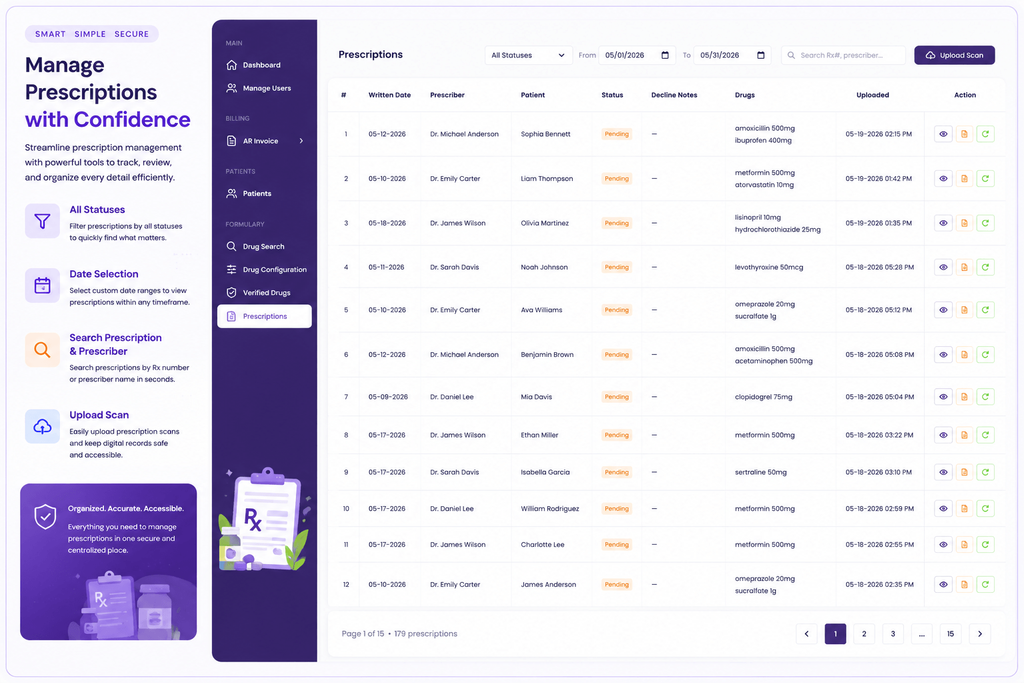
The prescription list with filters, search and upload options
Prescription Verification
Opening a prescription shows a detailed review screen. The doctor and the patient are matched against existing records, and a prescriber who cannot be confirmed is flagged so that it can be assigned. Each medicine on the prescription carries its own status, such as complete or needs review, so one unmatched item never blocks the rest.
Nothing moves forward without an explicit decision. The pharmacist reviews the evidence on screen and then chooses to confirm or decline the prescription, and the steps taken along the way are kept in logs. The system handles the reading and the arithmetic, and the pharmacist makes the final call.
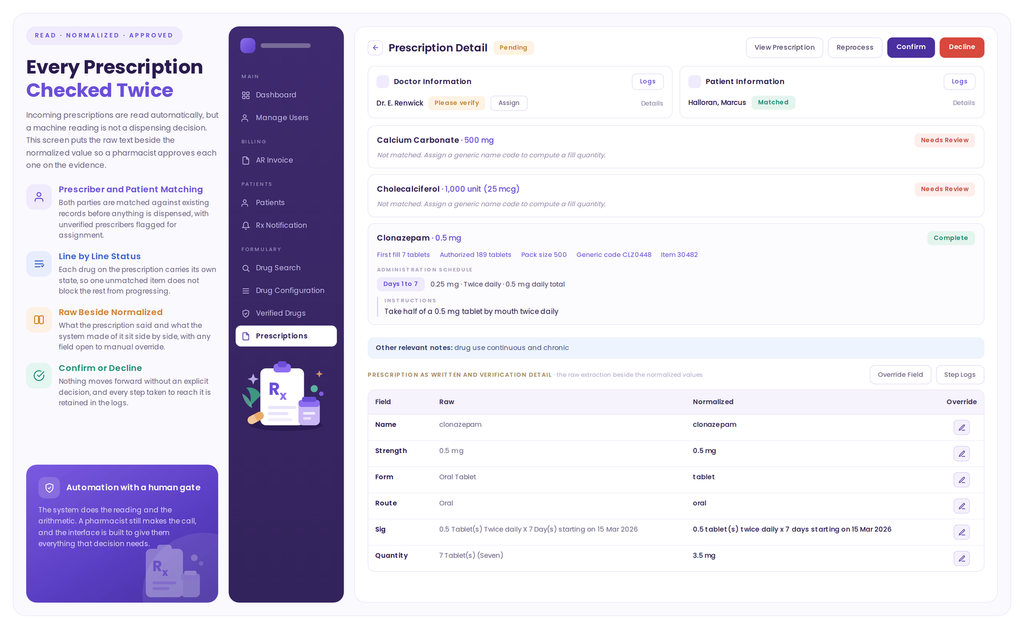
The prescription detail screen supports review, confirmation and decline
OCR and Prescription Scanning
Many prescriptions begin as images or scanned documents. OCR based scanning helps turn the text on those images into structured information that the pharmacy can review and manage. Instead of retyping every detail, staff start with fields that are already filled in.
The review screen shows the prescription as written next to the value the system understood. Each field, such as name, strength, form, route, directions and quantity, appears in its own row with the raw reading on one side and the organized value on the other. If a reading needs to be corrected, an override option is available on every field.
This keeps the process transparent. The scan saves time on data entry, and the pharmacy team keeps full visibility and control over the final information.
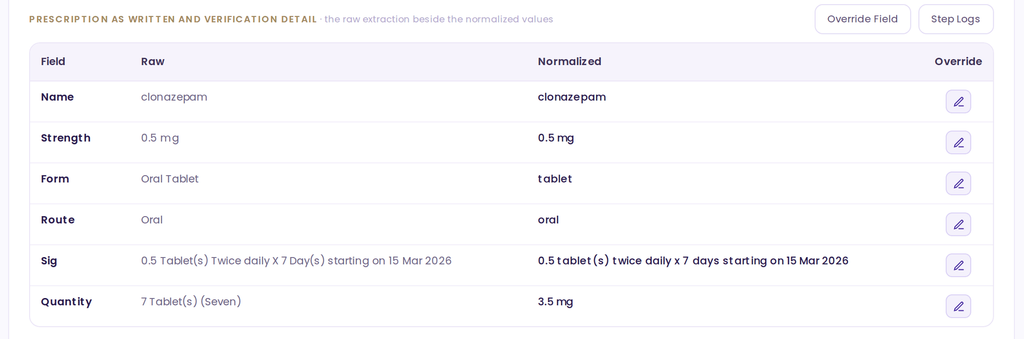
Raw prescription text shown beside the organized values, with an override option for each field
Drug Normalization
Drug normalization means turning many different ways of writing the same medicine information into one standard form. A medicine might be written as an oral tablet in one place and simply as a tablet in another. Normalization brings these variations together so the information is consistent and easy to search.
In the platform, normalized values are shown for the name, strength, form, route, directions and quantity of each medicine. The detail screen also shows a generic code, pack size, authorized quantity and a dosing schedule with plain instructions. When a medicine cannot be matched, the screen says so clearly and asks staff to assign a generic name code before a fill quantity is calculated.
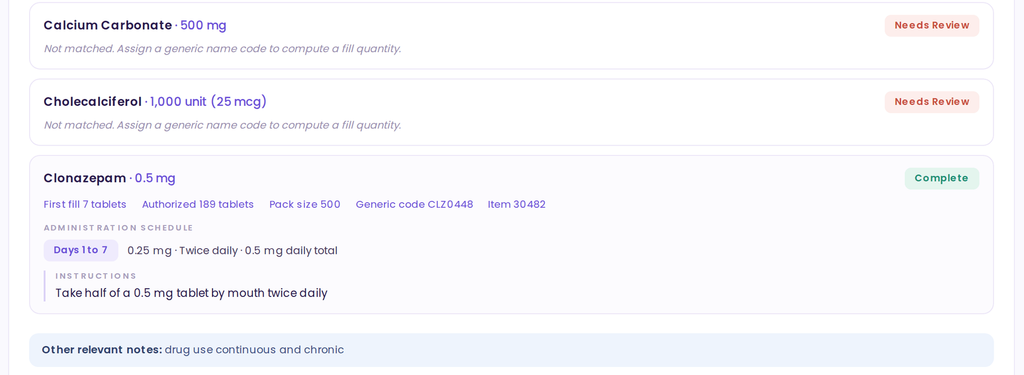
Each medicine on a prescription carries its own status, standardized values and dosing schedule
Standardization is supported by reference data that pharmacy staff maintain directly. Routes of administration, dosage forms and groups are defined once and reused across every configured drug, each with a plain language description. The screen also shows where each entry is used, and entries that are in use are protected from deletion.
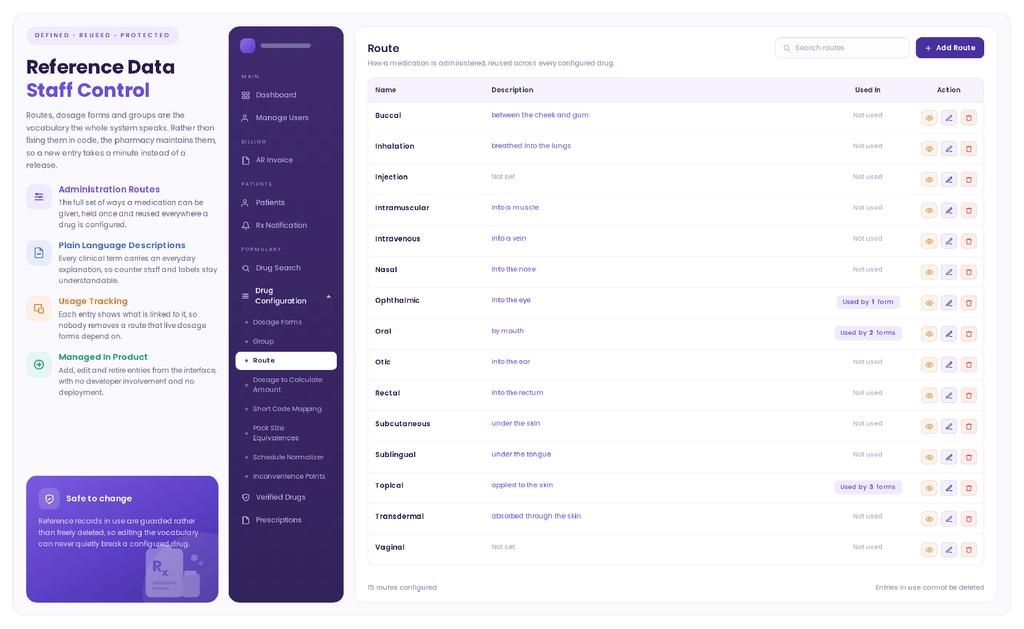
Reference data for routes of administration, managed by pharmacy staff
Prescription Reprocessing
Sometimes a prescription needs another look. Information may have been corrected, a missing match may have been added, or a reading may need to be refreshed. The reprocessing workflow gives the pharmacy a clear way to review or process a prescription again when required.
The option is available in two places: as a button on the prescription detail screen, next to the view, confirm and decline actions, and as a quick action on each row of the prescription list. Users do not need to start over or repeat earlier work, because the earlier steps remain available in the step logs.

Prescription actions include view, reprocess, confirm and decline
Product and Drug Catalogue
Organized medicine information supports nearly every part of pharmacy work. The verified drug catalogue is a curated list of generic drugs that the pharmacy has marked as verified. Instead of a large database full of entries that are never used, the team works from a short and deliberate list.
For each drug the catalogue shows the default dosage form, the number of strengths, products, manufacturers and vendors, and the stock currently available. Colour coding makes it easy to tell in stock items from those that are out of stock. Staff can see how easily a drug can be sourced before a prescription is promised.
Because dispensing, ordering and billing all read from the same verified list, a drug means the same thing everywhere in the system.
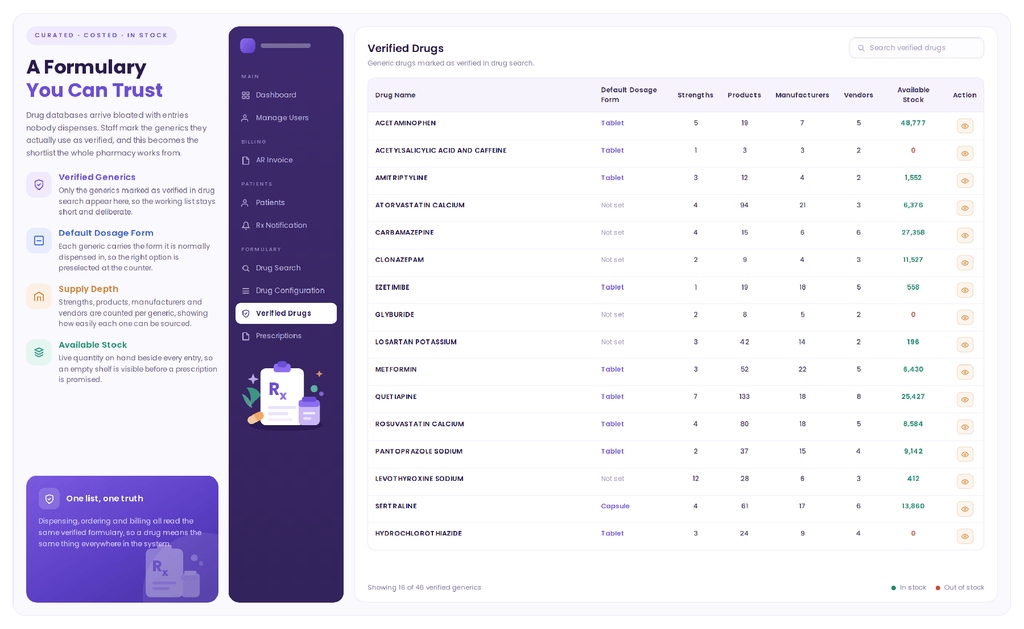
The verified drug catalogue with product depth and available stock
User Experience
The screens share one visual language, which makes the platform feel familiar from the first page. Navigation stays on the left, the main work area sits on the right, and each module follows the same structure of title, filters, data table and actions.
| Clear Organization The menu is grouped into Main, Billing, Patients and Formulary so every tool has a logical home. | Easy Navigation One persistent menu and a highlighted current page keep users oriented at all times. |
| Structured Information Tabs, tables and cards break detailed data into small, focused areas. | Readable Data Status labels, colour cues and plain language descriptions make records quick to scan. |
| Efficient Workflows Search, date filters, time ranges and row level actions shorten common tasks. | Consistent Interface Buttons, labels and layouts behave the same way across all modules. |
Business Value
The platform gives the pharmacy practical, everyday benefits by organizing information and workflows in one place.
| Better Organization Documents, patient records and drug data are kept in structured, searchable areas. | Structured Prescription Workflows Each prescription follows a clear path from upload to review and decision. |
| Less Manual Work Scanning and standardization reduce the need to retype and recalculate details. | Easier Access To Information Search and filters help staff find the right record quickly. |
| Improved Workflow Visibility Statuses, queues and logs show what is pending and what is complete. | Consistent Medicine Information A verified catalogue and shared reference data keep drug details uniform. |
| Centralized Management Prescriptions, patients, notifications and billing are managed from one platform. | Traceable Activity Histories and logs record changes, messages and processing steps. |
Result
The completed Pharmacy Management System gives pharmacy teams a more organized digital environment for managing their work. Prescriptions can be uploaded, read, matched, reviewed and decided in a clear sequence. Patient details, refill messages and organization invoices are kept in the same place, and medicine information follows a single standard.
The platform shows how thoughtful software design can reduce scattered information and manual effort while keeping the pharmacist firmly in control of every decision.
Conclusion
The Pharmacy Management System delivers a structured, centralized and easy to use workflow for pharmacy operations. By combining prescription management, verification, OCR scanning, drug normalization, reprocessing, a verified drug catalogue, patient records, notifications and invoicing, the platform supports clarity at every step of pharmacy work.
The outcome is a dependable digital foundation that helps a pharmacy stay organized, keep information consistent and focus on what matters most, which is providing careful and reliable care to patients.