Routd Innovation in Motion
Routd Building a Connected Digital Platform for Route, Order and Driver Operations
How a single web platform brings orders, routes, drivers, clients and vending operations into one managed system, with live status at every step.
Project Overview
Routd is a web based logistics management platform. It gives operators one place to create orders, build routes, assign drivers, follow deliveries and administer clients, contracts and subscriptions.
The product is built for companies that run scheduled deliveries and need to see, assign and control that work from an admin console. Its aim is to let teams track, manage and deliver with confidence, all in one platform.
The product is organised around these areas: a Home operations view, an Admin Dashboard, Order Management, Route Management, Driver Management, client, contract, subscription and invoice administration, user privileges, reports, support tickets, and a Vending Dashboard for machine, inventory and sales monitoring.
The objective was to replace separate tools for each of these tasks with one connected system, where an action in one area (such as assigning a driver to a route) is reflected everywhere else.
| 100+ Active Drivers | 1,000+ Orders per Day | 100+ Routes per Day | 500K API Requests per Day |
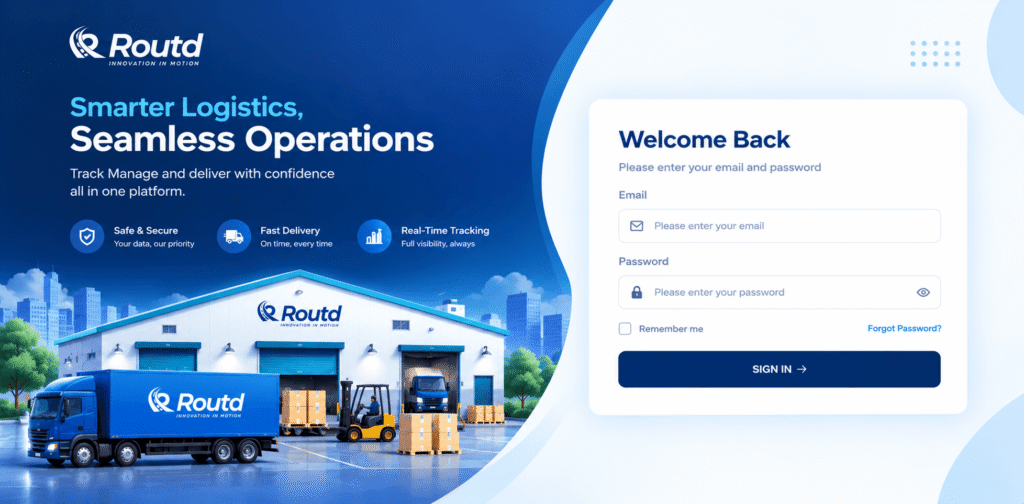
Routd product entry point. The signing experience introduces the product’s three commitments: secure data, on time delivery and real time tracking.
The Problem
Delivery operations involve many moving parts at once: customers and their orders, the routes that group those orders, the drivers and vehicles that run them, and the contracts and subscriptions that govern the relationship. When these live in separate places, running a day of deliveries depends on people stitching information together by hand.
| Operational complexity A route is not just a list of stops. Each has a start and end address, a driver, a vehicle registration, a time window and a status that changes through the day. Some routes and orders repeat on a schedule. Managing this without a structured model is hard to keep consistent. | Fragmented information An order carries customer contact details, delivery address, product weight, a delivery window and any cancellation reason. Drivers carry profiles, vehicles, documents and assignments. Spread across tools, none of this can be read together. |
| Workflow friction Creating orders, uploading drivers and setting up routes one record at a time does not scale. Drivers also submit profile changes that need review before they take effect. | Limited visibility and control Managers need to know which deliveries are on time, late, failed or pending, where a driver is, and which drivers are active, offline or suspended. Without a shared status model, answering these questions means asking people. At the scale Routd runs, with more than a thousand active drivers and thousands of orders each day, that approach stops working. |
The challenge was not simply to build another software application. It was to create a connected digital system that could simplify the underlying business operation.
Analysis
Before deciding what to build, the team analysed the delivery operation as a chain of related decisions rather than a set of separate features. The questions were: who acts, on what data, and what must change elsewhere as a result.
Business workflow analysis
Each row follows one business need through to its outcome: who acts, in which workflow, on what data, and with what result.
| Business need | User | Workflow | Data | Action | Outcome |
| Get deliveries planned | Admin / operations | Create orders: single, bulk or repeating | Customer, address, weight, delivery window | Assign orders to routes | Structured, route-based work |
| Put the right driver on each route | Admin / operations | Driver assignment | Driver profile, vehicle, status | Assign driver to route | Route with an accountable driver |
| Know what is happening today | Admin / manager | Home and Admin dashboards | Order and route statuses, timeliness | Track driver, review late or failed work | Informed intervention |
| Run the client relationship | Admin / company | Client, contract, subscription and invoice management | Clients, contracts, plans, invoices | Set up and maintain accounts | Controlled commercial setup |
User and stakeholder analysis
Routd serves several kinds of users, each with different needs:
| Platform administrator Needs to oversee everything. Accomplishes: client, contract and subscription setup, user privileges, invoices. Information: lifetime totals, subscription plan, recent activity. | Operations / dispatch user Needs to plan and monitor the delivery day. Accomplishes: create orders and routes, assign drivers, track progress. Information: route and order statuses, time windows, driver location access. |
| Driver Needs to be assigned work. Accomplishes: runs routes with progress states from shift start to completion. Drivers also submit profile updates, which go through an approval step. | Client company and customer Needs reliable deliveries. The platform holds clients, company users and end-customer details (name, email, mobile, address) attached to orders. |
Product architecture and module analysis
The module structure follows the operating chain. Commercial modules sit at one end, operational modules in the middle, and monitoring across both.
Client Management → Contract Management → Subscriptions → Order Management → Route Management → Driver Management → Home / Dashboard → Reports
Orders are grouped by route. Routes are run by drivers. Dashboards read status from all three. The same structure is repeated in a Vending Dashboard, which gives a monitoring view of machines, inventory, cash and sales.
Data and workflow relationships
| Order → Route The order list can be filtered by route, and each order records its route name. Route-level totals show how many orders each route carries. | Route → Driver Each route holds a driver and vehicle registration. Route status moves from Created and Driver Assigned through Shift Started, Order Picked Up, On The Way and Completed. | Status → Dashboard Order outcomes (on time, early, late, failed, pending) roll up into the Home summary cards and the Admin Dashboard’s timeliness and failure figures. |
This is why Routd was designed as a connected system: a status change on a route or order surfaces in the views managers use to make decisions.
Solution
The solution was structured around the operational chain identified in the analysis. Each capability below addresses one specific part of it.
Order Management
| Problem | Solution | Business benefit |
| Order details, delivery windows and outcomes were hard to hold in one place, and entering them individually does not scale. | A central order register with stage tabs (Order Created, Route Assigned, Order Picked Up, On The Way, Order Delivered, Delivery Failed, Incomplete, Unfulfilled, Cancelled By Admin). Each record holds the customer, address, weight, delivery window and cancellation reason. Orders can be created singly, uploaded in bulk, or set to repeat, and filtered by route. | Every order and its stage is visible in one list. Setup effort drops for larger volumes, and failed or cancelled work carries its reason. |
Route Management
| Problem | Solution | Business benefit |
| Routes need start and end points, order counts, driver assignment and live progress, and recurring routes need repeated set-up. | A route register showing ID, name, driver, driver online or offline status, route status, total orders, and starting and ending point with addresses. Routes can be created, bulk uploaded, filtered by driver, and managed as Repeating Routes. | Operators see which routes are complete, assigned, incomplete or in progress without checking route by route. |
Driver Management
| Problem | Solution | Business benefit |
| Drivers, vehicles, documents and status are managed as one workforce but tracked as separate items. | A driver console with status cards (total, active, offline, suspended) and sub-areas for profile requests, vehicles, documents, assignments, performance, notifications and an activity log. Drivers can be added individually or by bulk upload. | Availability and compliance information sits next to assignments, and profile changes pass through an approval step. |
Home operations view
| Problem | Solution | Business benefit |
| Managers need a live answer to “how is today going?” and a way to reach the driver involved. | A control-centre screen with colour-coded summary cards (all, pending, early, on time, late, failed, others), searchable route table, Today/Weekly/Monthly/Yearly filters, a Track Driver action, time-windowed order details per route, and a shortcut to mileage issues. | Problems stand out through colour and status, so attention goes to the routes that need it. |
Admin Dashboard and account administration
| Problem | Solution | Business benefit |
| Decision-makers need a summary of volume, delivery performance and account health, plus control over who can do what. | Lifetime totals (contracts, customers, active drivers, completed orders, failed deliveries, mileage in beta), the current subscription plan, interval metrics with week-on-week comparison, a performance chart and a recent-activity feed. Alongside sit modules for clients, contracts, user privileges, company users, subscriptions, invoices and support tickets. | Performance trends and commercial administration are handled from the same console. |
Vending Dashboard
| Problem | Solution | Business benefit |
| Machine-based operations need their own view of stock, uptime and sales across sites. | A monitoring dashboard with transactions, machine sales, uptime, inventory value, inventory by site and machine, a transactions chart (successful and failed), machine performance, sales by category and top machines. The sidebar adds Machines, Smart Management and Cash Management. | Low-stock sites and underperforming machines are flagged through colour bands and rankings. |
Product Experience
This is the solution from the user’s side, in the order a manager would typically meet it.
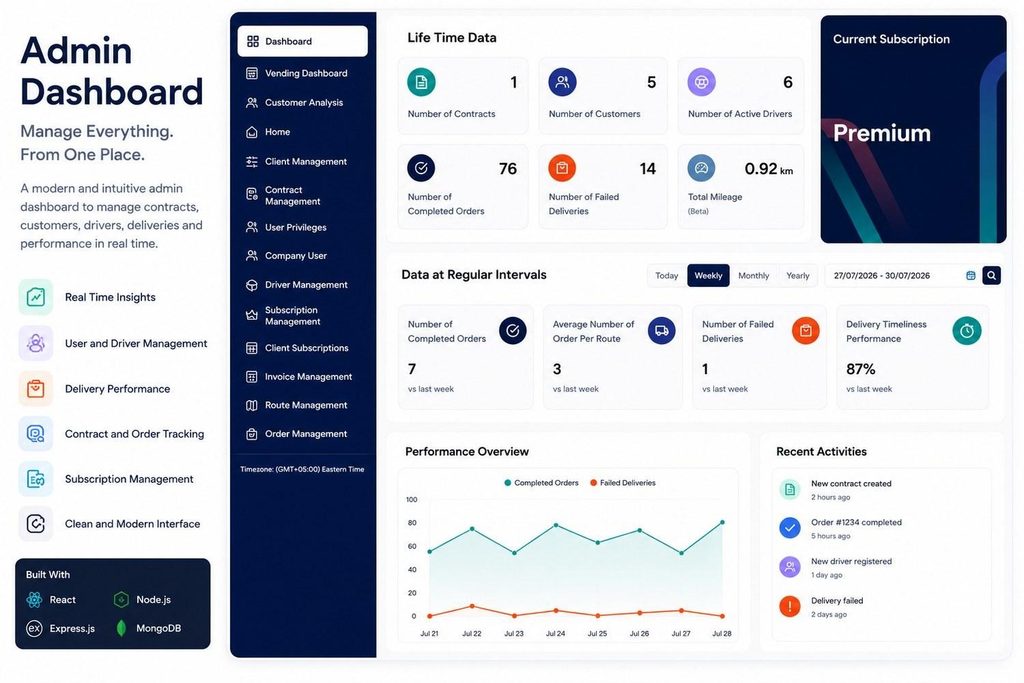
Admin Dashboard. Lifetime totals, interval performance and recent activity on one screen. The side menu covers every module, making the dashboard the entry point to the whole system.
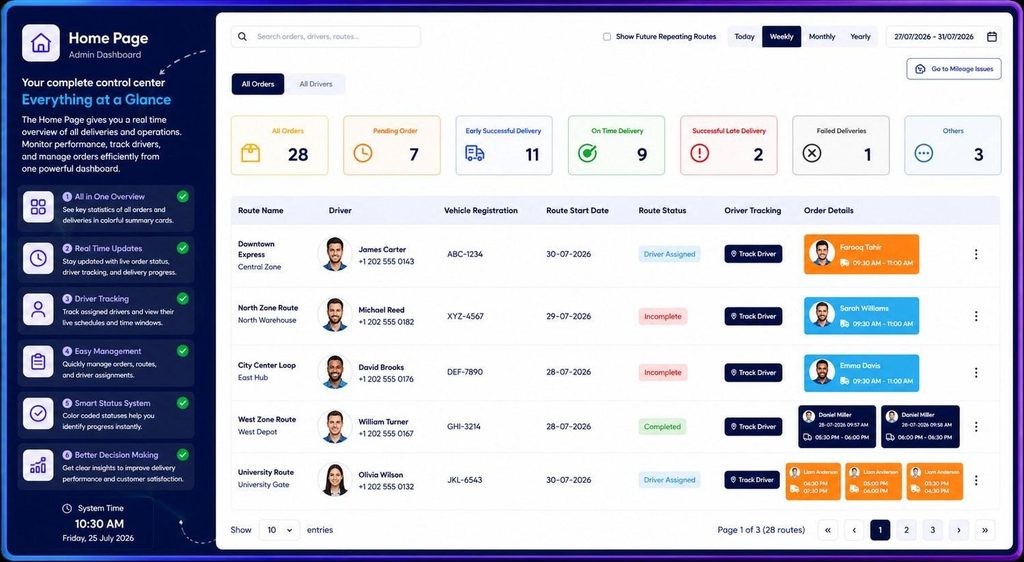
Home operations view. Status cards and a route table with driver tracking and time-windowed orders. Every route has a Track Driver action and a colour coded status.
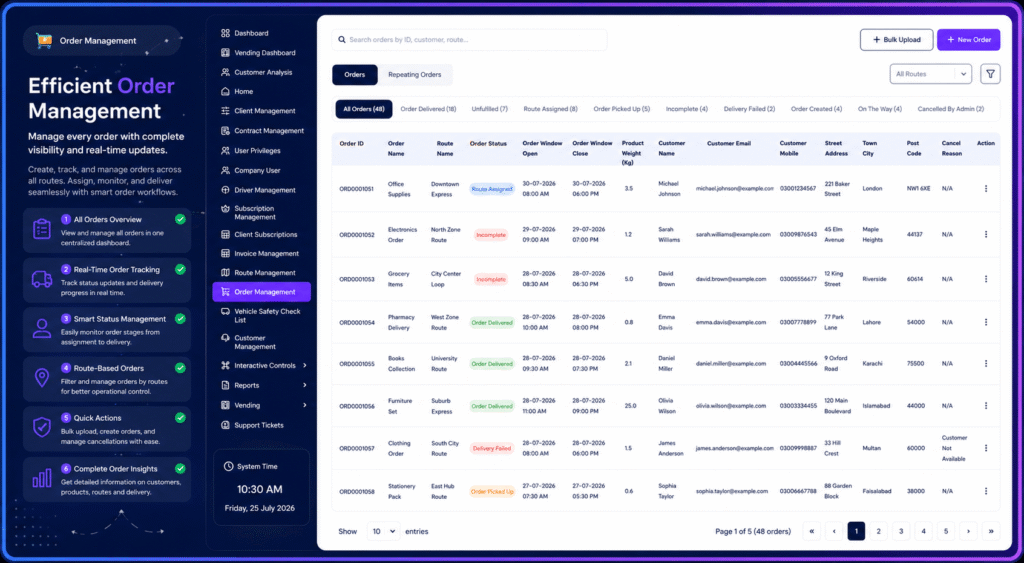
Order Management. Orders by stage, with customer, address, weight and delivery window in one table. Stage tabs with counts let users jump straight to failed or unfulfilled orders.
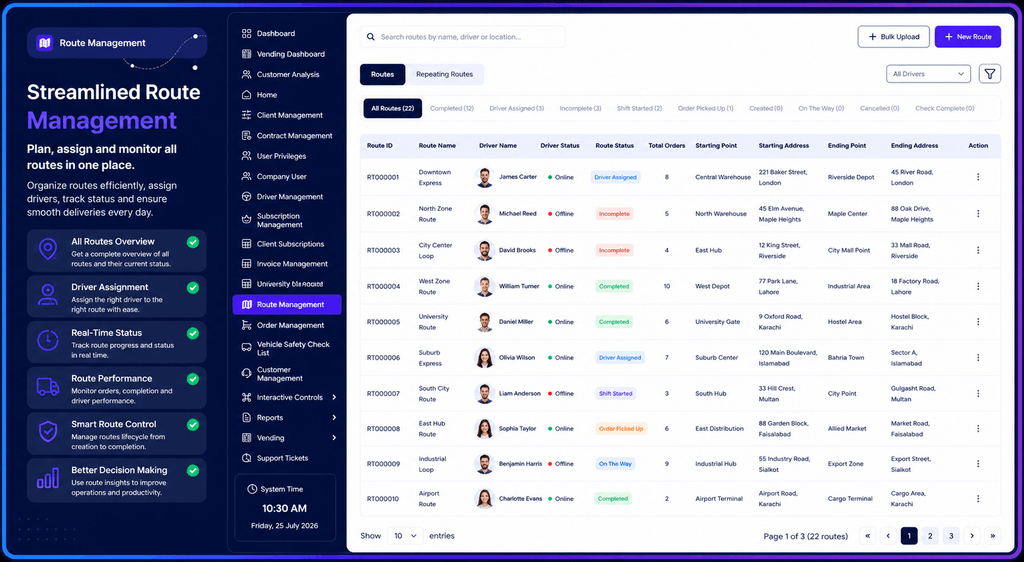
Route Management. Route, driver, status and start and end points in one register. Driver online/offline status appears beside route status.
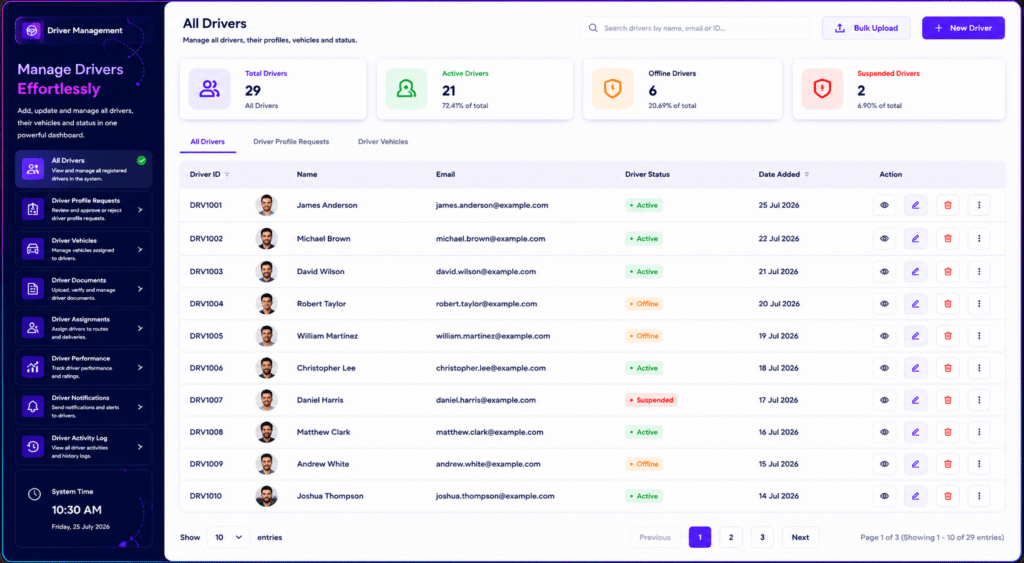
Driver Management. Driver counts by status with a sub-menu for vehicles, documents, assignments and performance. Active, offline and suspended counts appear as percentages of the total.
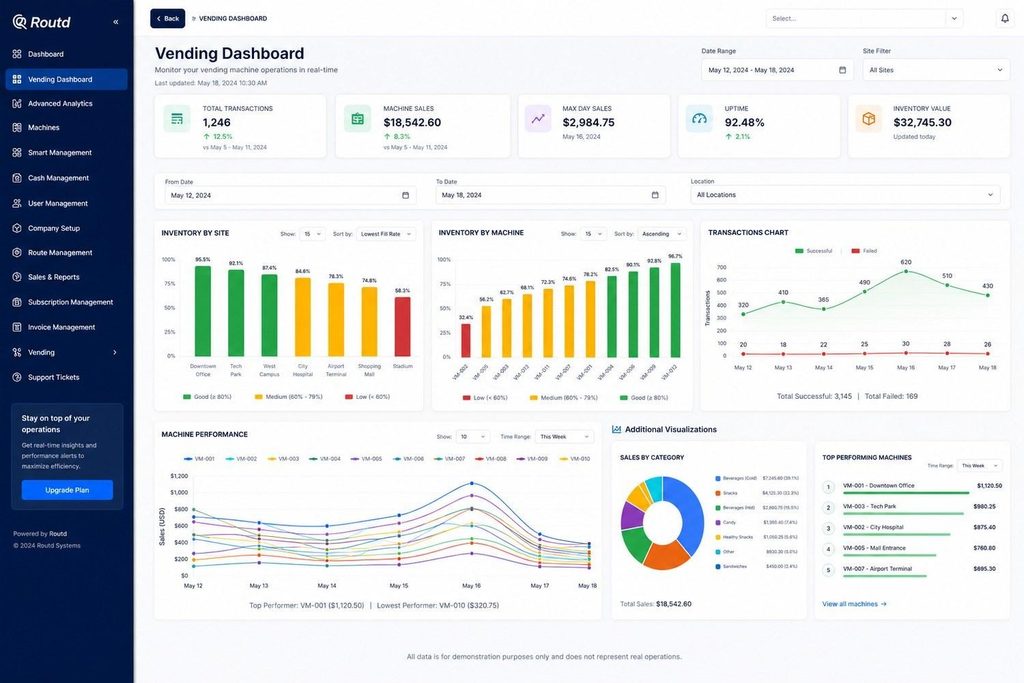
Vending Dashboard. Inventory, transactions and machine sales monitored by site and machine. Colour bands (good, medium, low) show inventory health at a glance.
End to End Workflow
This is how a delivery moves through Routd, from setup to outcome.
End to end business workflow
| Business Input | Client, contract and subscription are set up. Orders are created singly, in bulk or as repeating orders, with customer, address, weight and delivery window. |
| Routd Process | Orders are grouped into routes with start and end points. A driver and vehicle are assigned. Route status becomes Driver Assigned. |
| Management And Decision | The Home and Admin dashboards show pending, on-time, early, late and failed deliveries. Managers track drivers and review mileage issues. |
| Operational Action | The route progresses through Shift Started, Order Picked Up and On The Way. Orders end as Delivered, Delivery Failed or Cancelled by Admin, with a cancel reason where relevant. |
| Business Outcome | Completed and failed work feed the performance overview, driver performance and reports. |
Business transformation
| Before Routd• Orders, routes and drivers tracked separately• Individual record entry• Delivery status found by asking | Routd• Orders, routes, drivers in one data model• Bulk upload and repeating schedules• Shared status system | After Routd• Live view of deliveries and drivers• Structured, consistent operations• Clear control over assignments and accounts |
Results
Routd runs at operational scale, supporting the daily work below. The outcomes that follow describe how the operation changes with the platform in place.
| 100+ Active Drivers | 1,000+ Orders per Day | 100+ Routes per Day | 500K API Requests per Day |
| Before• Orders, routes, drivers and accounts handled as separate concerns• Records created and updated one at a time• Delivery progress needed to be gathered manually• No single status vocabulary across orders and routes | After• One platform covering orders, routes, drivers, clients and subscriptions• Bulk upload and repeating orders and routes for recurring work• Live summary cards, driver tracking and timeliness metrics• A platform that handles ≈500K API requests per day• Consistent colour-coded statuses across modules |
Business Impact
| Centralized operations One environment for orders, routes, drivers and client administration, so teams work from the same records. | Operational visibility Dashboards and status cards show delivery timeliness and failures as they stand, supporting faster decisions. |
| Structured driver control Driver status, vehicles, documents and assignments are managed together, with approval for profile requests. | Reduced repetitive work Bulk upload and repeating orders and routes cut the manual entry that recurring work would otherwise need. |
| Commercial administration Contracts, subscriptions, invoices and user privileges sit inside the same product as operations. | Extensible monitoring The Vending Dashboard shows the same approach applied to machines, inventory and sales. |