Aly
Aly is a secure healthcare web application that brings appointments, scheduling, communication, consults and care quality into one place. It was developed by Devox Technologies.
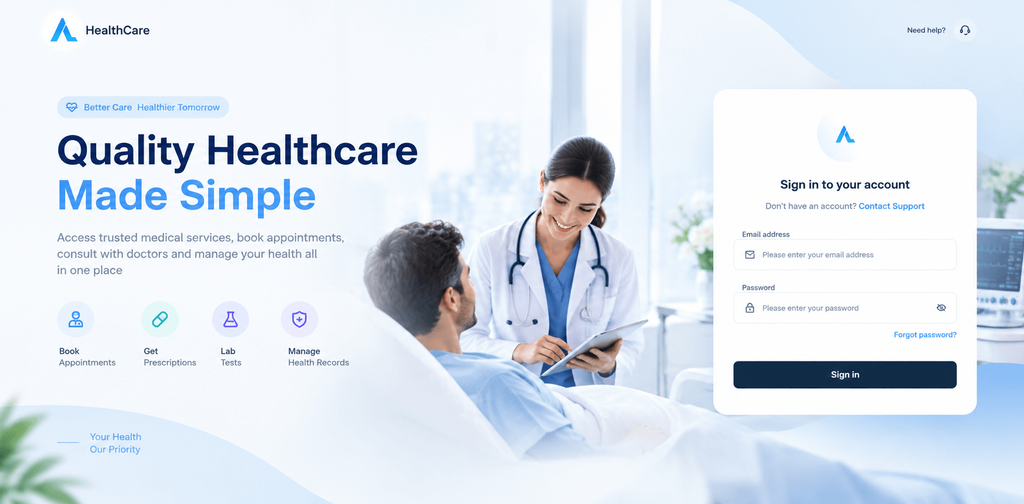
The Aly sign in screen.
Project Overview
Aly is a digital product developed by Devox Technologies to deliver a clear and intuitive healthcare experience. It gathers the everyday work of care into a single secure application, so that people do not have to move between separate tools to schedule, communicate, track and measure.
The sign in screen introduces the idea with the headline Quality Healthcare Made Simple. It points to four everyday needs, booking appointments, getting prescriptions, lab tests and managing health records. Once inside, a consistent navigation rail leads to consults, chats, schedules, metrics, survey metrics, team, timesheets, hospitals and programs.
Devox Technologies developed the product and its interface, including the scheduling views, the chat experience, the consult tracking table and the survey metrics dashboard shown in this case study.
Problem
Healthcare work depends on many moving parts that need to stay aligned. Care programs run across hospitals. Doctors work on different schedules and shifts. Patients, doctors and nurses need a dependable way to talk. Each consult has to be followed from the moment it is created until it is signed off, and the quality of care has to be measured.
When these tasks are handled separately, teams lose time and clarity. Schedules are harder to keep consistent, messages may happen outside a secure space, consult progress can be missed, and quality information is difficult to read in one view.
- Schedules that drift apart. Care programs, doctor schedules and shift templates need to stay in step.
- Communication that needs to be secure. Conversations about care call for a protected place with the right context.
- Consults that need follow through. Teams need to see what is pending, acknowledged, in progress or delayed.
- Quality that is hard to see. Survey results need to be summarized and filtered to be useful.
Analysis
Across the screens of Aly, several deliberate choices shape how the product feels to use. They make a wide range of healthcare tasks feel familiar from one area to the next.
One navigation rail everywhere
A slim icon rail on the left keeps the same areas in the same order on every screen: consults, chats, schedules, metrics, survey metrics, team, timesheets, hospitals and programs. The active area is highlighted, so people always know where they are.
Tabs and filters that match the task
Each area offers its own tabs and filters. Scheduling has tabs for programs, doctors and shift templates. Consults and survey metrics add filters for hospital, doctor, program and date range, so a long list can be narrowed quickly.
Status you can read at a glance
Status appears as small colored labels such as Active, Completed, In Progress, Pending and Signed Off. Consult tabs carry counts, and delayed items show their delay in red, so attention goes where it is needed.
Information grouped into clear cards
Summary figures, lists and detail panels sit in separate rounded cards on a light surface. Related information stays together and the page never feels crowded.
Comfort for different working styles
A Dense toggle, rows per page controls and search fields give people control over how much they see at once.
A calm, consistent look
A restrained blue palette, rounded shapes and generous spacing give the product a trustworthy feel that suits healthcare, and it stays the same on every screen.
Solution
Aly answers these challenges with focused areas that work together. Devox Technologies designed and developed each one to feel part of the same product.
Care Program Scheduling
The scheduling area keeps three views of the same work close together: care program schedules, doctor schedules and shift templates. The main list shows each program with its associated hospital and status, and a search field plus hospital and status filters narrow it down.
Beside the list, a doctor schedules panel shows each doctor with a specialty, working hours and a status such as On Call or In Clinic. A shift templates panel lists reusable shifts such as morning, evening, night and weekend, each with its hours. A New Program button starts a new program from the same screen.
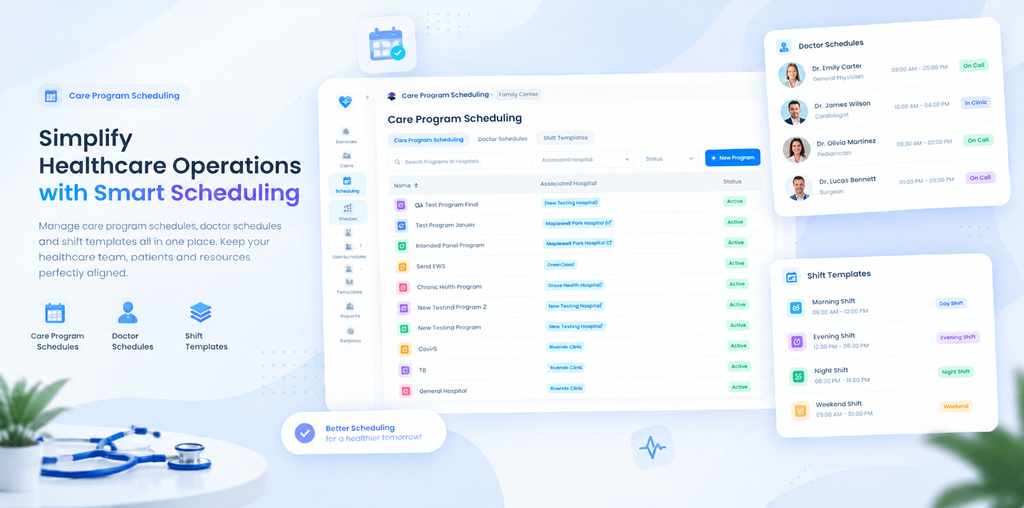
Care Program Scheduling programs, doctor schedules and shift templates together.
Secure Communication
The chat area gives patients, doctors, nurses and care teams a secure and simple place to talk. A conversation list with search sits on the left, and the open conversation fills the rest of the screen with message bubbles, times, read ticks and a message box with attachment, emoji and send controls.
Files can be shared inside the conversation, such as a lab report with its file size and a download button. Voice and video call buttons sit in the conversation header, and a notification card announces new messages. Online indicators and unread counts help people find the right conversation quickly.
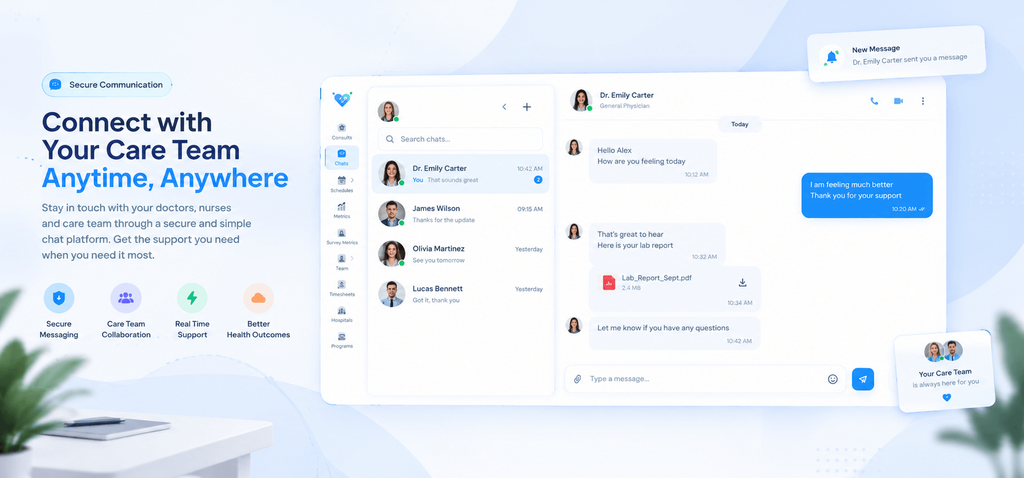
Secure Communication conversations, shared files and call controls in one view.
Consult Tracking
The Consults screen is built for follow through. Tabs for All, Pending, Acknowledged, Patient Being Seen, Paused and Signed Off carry counts, so the state of the work is visible before a single row is opened.
Each row shows the patient, the consult type, its status, the date created and the hospital with the assigned doctor. Delayed consults show how long they have been waiting. Filters for patient name or record number, hospital, doctor and date range, together with a clear control, help teams find what they need. A Dense toggle and rows per page control complete the table.
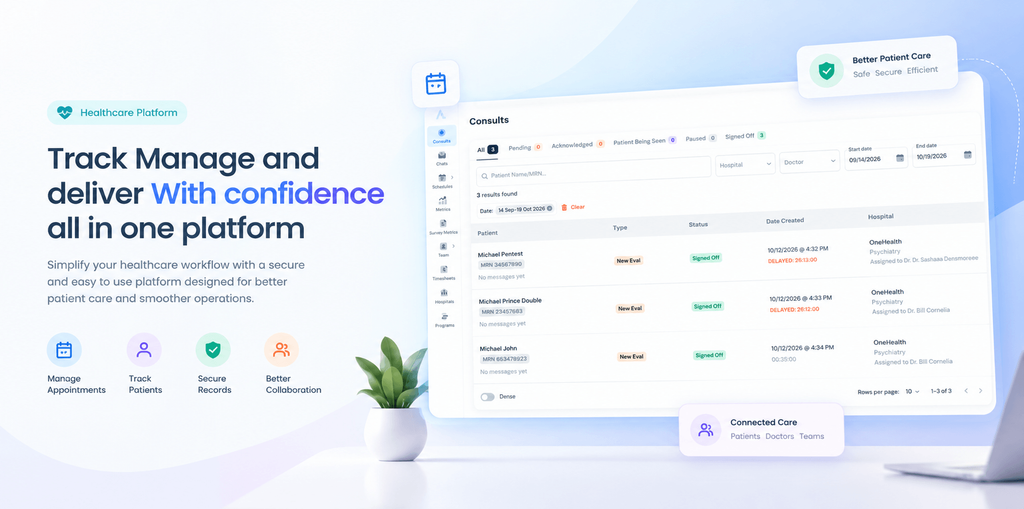
Consult Tracking status tabs with counts, filters and a clear table.
Survey Metrics
Survey Metrics turns patient feedback into information teams can act on. Four summary cards show the average score, response rate, pending surveys and skipped surveys, each with a comparison to the previous month.
Below the cards, filters for hospital, program, doctor and date range narrow the results. A table lists each survey by patient record with its status, score and completion date. A side card summarizes the purpose of the area: real time performance tracking, identifying trends and gaps, better resource allocation and higher patient satisfaction.
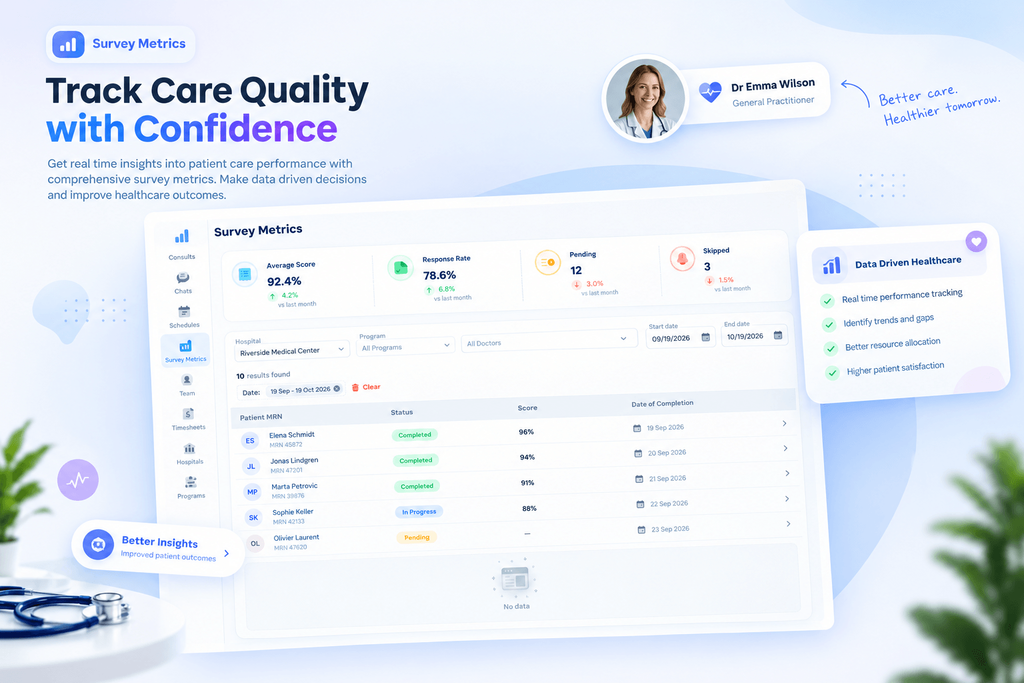
Survey Metrics summary cards, filters and a results table for care quality.
Result
Aly is designed to make healthcare operations easier to organize, easier to follow and easier to improve. Its value comes from how the areas support one another: schedules keep teams aligned, chat keeps conversations secure, consult tracking keeps work moving, and survey metrics show how care is going.
- Better organization. Programs, doctor schedules and shift templates sit side by side instead of in separate places.
- Protected conversations. Messages, shared files and calls happen in one secure space with clear context.
- Clearer follow through. Status tabs, counts and delay indicators make it easy to see which consults need attention.
- Easier quality reviews. Summary cards and filters make survey results simple to read and compare.
One application for the whole care workflow
Aly brings scheduling, secure communication, consult tracking and survey metrics into one consistent and calm interface. Devox Technologies developed the product from its navigation and workflows to the screens people use every day, creating an application that supports better care and smoother operations.